Organized call handling
We define who receives each call and the required routing, then test the call flows.

UniFi Talk · Cyberprotech
We organize your business telephony, from reception phones to your phone system. With UniFi phones and a setup tailored to your team, we help simplify everyday communication.
We plan extensions, call destinations and workstations around how your organization serves customers and communicates internally.
We define who receives each call and the required routing, then test the call flows.
Connect team workstations with internal extensions and video calls between compatible devices and setups.
We assess G3 phones with your existing SIP/PBX system or UniFi Talk on a compatible console.
In supported installations, phones can display Protect cameras and unlock Access doors.
Features depend on the phone system, model and installed version. We confirm each integration during the project.
Official UniFi information ↗FEATURE HIGHLIGHTS
UniFi Talk
Touchscreen phones in desktop or wall-mounted formats for different spaces.
UniFi Talk
The wireless G3 handset adds mobility near your workstation on compatible models.
UniFi Talk
Explore Protect and Access functions on phones, with permissions tailored to each user.
UniFi Talk
Internal video calls between compatible devices in a UniFi Talk system.
Images and demonstrations: Ubiquiti. Availability and features depend on model, region and configuration. View at Ubiquiti ↗
Five G3 and G2 phones and a wireless handset, listed in the European UniFi catalog. We check the deployment mode supported by each generation.
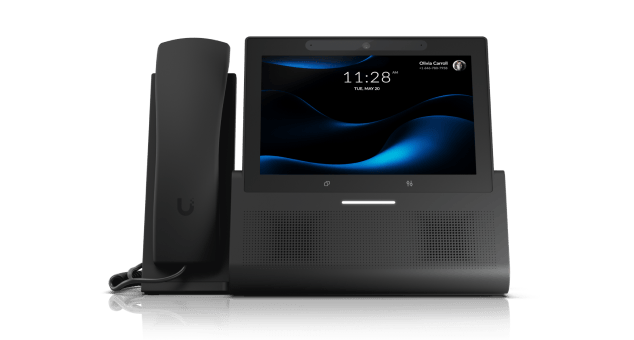
A 7-inch display for reception and desktop use.

Wall-mounted format with a 7-inch display for communication points across your premises.

Desktop format with a 5-inch display for everyday work.

Wireless handset for compatible G3 Touch phones.

A G2 desktop phone for compatible UniFi Talk installations. Direct G3-style SIP/PBX mode is not assumed.

A G2 desktop phone for compatible UniFi Talk installations. Direct G3-style SIP/PBX mode is not assumed.
For third-party SIP providers, we select compatible unlocked equipment. Carrier and hosting costs, where applicable, are assessed separately.
We review existing numbers, extensions, carrier, phone system and call flows.
We define equipment, PoE power, voice networking and the migration approach.
We test inbound and outbound calls, audio, transfers and agreed routing.
We document the solution, support your team and help with updates and incidents.
We assess compatibility with your SIP service and existing phone system. Keeping or porting numbers depends on the carrier and is confirmed before migration.
UniFi Talk can run on a compatible local console. Alternatively, G3 phones can register with an external SIP/PBX system; available features depend on the chosen setup.
Portugal is not currently listed among countries offering UniFi’s own SIP service. For external calls, we assess a compatible SIP carrier serving Portugal.
Not for configuring SIP credentials directly on G3 phones. Talk Relay enables provisioning and remote management through the paid UniFi Official Hosting service.
A compatible console is required for a local UniFi Talk phone system. Using G3 phones with an external PBX follows a different architecture, which we assess with the provider.
Carrier requirements, the phone system and the model must be checked. Integrating a third-party carrier with UniFi Talk requires unlocked phones.
Yes. We plan a pilot, call testing and a migration window, with a rollback plan agreed with your organization and carrier.
The ecosystem offers integrations with UniFi Protect and Access in supported setups. We confirm equipment, applications and permissions before enabling them.
Tell us how your telephony works. We help define a solution that suits your team and customers.
Images and demonstrations: Ubiquiti. Availability and features depend on model, region and configuration.